Spinbetter iOS Canada: Download the App for iPhone
Welcome Bonus
For new players
+ 150 Free Spins
18+ only. T&Cs apply.
For players who want immediate access to sports betting and online casinos, Spinbetter iOS Canada is available for iPhone and iPad. This guide will detail how to safely download the app, what the features are for Canadian users, and how to register, take advantage of bonuses, and make safe payments in CAD. You should only download the application from trusted and official Spinbetter sources for your security.
What Is the Spinbetter Mobile App for iOS in Canada

The application is designed in such a way that it can be used easily in day-to-day life. Mobile users can:
Customize push notifications for important updates.
Follow live sports with background streaming support where available.
Access betting history and account settings quickly.
Manage deposits, withdrawals, and available bonuses from one place.
Enjoy smooth navigation optimized for touch controls.
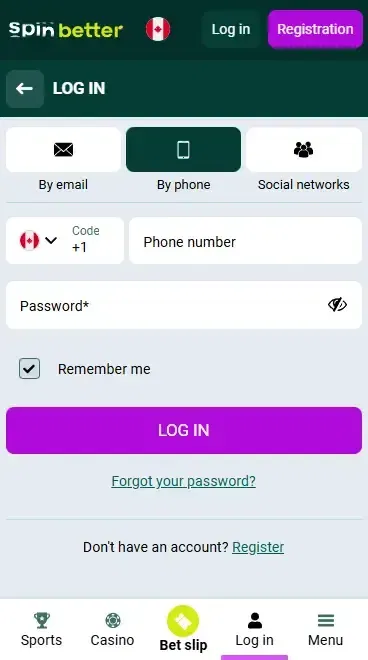
You can log in with the same credentials on both the desktop website and the iOS application. Your account balance, winnings, betting history, and personal information are all synced between devices, eliminating the need for you to log in to an account on your mobile device!
Spinbetter iOS Availability in Canada
The Spinbetter iOS application is not available for several reasons:
The region selected in the App Store.
Apple's policies for distributing real-money gambling applications.
Compatibility between your Apple device and the supported iOS version.
It's important to note for Canadian users that availability of the application in the App Store does not mean that all Spinbetter services are available in Canada. Local availability and service policies of the operator may apply, so please check the latest details on the official Spinbetter website before trying to download the application.
System Requirements for the Spinbetter App for iPhone and iPad
The requirements listed below are from the most recently available information from the official Spinbetter download resources. May be updated with new versions of the application, so please check the official download page before installing the application.
Supported Apple Devices
iPhone 6S
iPhone SE (1st generation) or newer
iPhone 7 and later
iPad Air 2
iPad (5th generation) and newer
Spinbetter System Requirements for iOS
| Requirement | Value |
|---|---|
| OS Version | iOS 13.0 or later* |
| Storage | Approximately 100 MB of free space recommended |
| RAM | 1 GB minimum (2 GB recommended for smoother performance) |
| Processor | Apple A9 chip or newer |
System requirements are subject to change with each new release of the app and iOS. Before installing, always refer to the official Spinbetter download page.
How to Download the Spinbetter Mobile App for iOS in Canada

Where to Download the iOS App Safely
Take a few minutes to check the source of the file before downloading the app!
- 1
Open Safari on iPhone or iPad.
- 2
Visit the verified official Spinbetter website.
- 3
Search for the Mobile App section.
- 4
Select the iOS version.
- 5
Check whether the website provides an official App Store or PWA installation option.
- 6
If the website requests an unknown configuration profile or redirects you to an unrelated third-party page, stop the installation immediately.
Download and Install the App
To speed up the process, you can install the application safely by downloading it from the official Spinbetter download page.
- 1
Tap the Download button on the official page.
- 2
Follow the instructions displayed on your screen.
- 3
Complete the installation using the available iOS method.
- 4
Open the application or home screen shortcut after it has been downloaded.
- 5
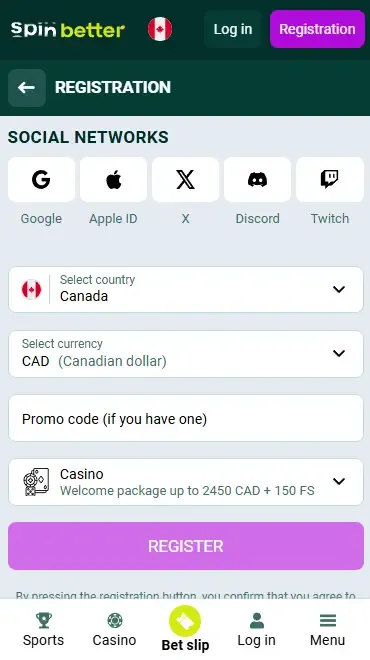
Register a new account or log in if you already have an account.
Spinbetter Mobile Website
The Spinbetter mobile website is a great alternative if you don't have an app on your device or in your region. It does not require an installation, but functions directly in your browser and offers access to sports betting, online casinos, payments, account management, and up-to-date promotions. For many users, the mobile website is a very similar experience to the app.
Adding the Spinbetter Mobile Site to the iPhone Home Screen
A Progressive Web App (PWA) is a shortcut on the web, which acts a lot like a native app and opens the original website in a streamlined interface. You can add compatible websites to the Home Screen via Safari, as officially supported by Apple.
- 1
Open the official Spinbetter website in Safari.
- 2
Tap the Share button.
- 3
Select Add to Home Screen.
- 4
Rename the shortcut if you wish.
- 5
Tap Add.
- 6
Launch Spinbetter anytime using the new Home Screen icon.
Note: Apple officially supports adding compatible websites to the Home Screen through Safari.
Spinbetter Mobile Site vs. iOS App
Below is a comparison between the two applications to help you determine which to use if you are considering the mobile website or the iOS version.
| Criterion | Mobile Site | iOS App / PWA |
|---|---|---|
| Installation | No installation required | Added from the official website or available installation method |
| Updates | Automatic when the website changes | Updated automatically for PWA or through the official source |
| Device Storage Usage | Very low | Low |
| Notifications | Limited browser support | Better notification support where available |
| Access | Opens in Safari or another browser | Opens directly from the Home Screen |
Common Issues and How to Fix Them
Sometimes, compatibility, regional availability, Internet connection, or software settings may cause installation issues. Many problems can be solved by performing some basic checks.
Common issues
No iOS download option is available. Use the official mobile website or the supported PWA version.
The application cannot be found in the Google Play Store. Return to the official Spinbetter website and review the latest installation instructions.
Installation does not finish. Check your internet connection and ensure there is enough free storage space.
The application will not open. Restart your device and make sure you are using a supported iOS version.
Login problems after installation. Verify your account credentials or use the password recovery feature if authentication fails.
General recommendations
Update iOS and Safari to the latest version.
Restart your device before trying again.
Check your internet connection.
Review the installation steps on the official website.
Contact Spinbetter customer support if the issue continues.
Sports Betting and Online Casinos on iOS
The Spinbetter Mobile platform provides access to sports betting and casino entertainment on one platform. On the mobile site, the primary menu provides an easy way to navigate between the Sportsbook and the online casino, with only a few taps. Each section is mobile-friendly, which means you can seamlessly switch between betting markets, games, your account, and existing bonuses without having to touch the platform.
These are some of the key features that can be found on mobile:
Wide coverage of pre-match and live sports events.
A large selection of online casinos, including slots, table games, and live dealer titles.
Quick navigation through sports, leagues, and tournaments.
Fast search for the event or game you want.
Filters for sports, competitions, game categories, and software providers.
High-quality live sports broadcasts where available.
Live dealer games with smooth video streaming.
Easy access to account settings, promotions, deposits, and withdrawals.
Sports and Live Betting in the Mobile App
Internet connectivity is crucial for sportsbookers, particularly for sports betting and live markets, where odds will fluctuate during the course of a game. The mobile platform provides up-to-date odds, enabling users to quickly respond as they place bets. Many live events offer bettors the opportunity to cash out early if they qualify to do so. If supported, live sporting events can be heard in the background while you select from other betting options.
Online Casino and Live Casino Games on iPhone
The mobile site lets you participate in most of the games at the desktop site on your iPhone. The search feature enables players to easily browse for titles, or utilize the category and provider filters to locate a more appropriate title. Live dealer tables and other games will work best if played on mobile devices, but loading time and video quality will rely on the user having a quality Internet connection.
App Features and User Experience on iOS
The mobile interface is designed to make everyday use simple and efficient.

Welcome Bonuses in the iOS App

To get a greater welcome bonus, use the promo code PROMOGIFT during the registration process or on your Personal Account, if available. The promo code boosts the cash welcome bonus by SpinBetter to 30%. The Cashback Bonus is higher for casino offers, while the number of free spins stays the same; for sports offers, both the payout amount and the number of free spins are increased. There is also a mobile platform where you can activate it!
Payment Methods Available in the Spinbetter Mobile App in Canada
Log in to your account and go to the Cashier or Payments section from the main menu to deposit or withdraw. The payment options shown are for your account region. Eligible Canadian accounts can be credited in CAD without having to do any manual currency conversion when you pay in or out of your account.
Mobile Payment Options in Canada
| Payment Method | Min. Deposit Amount |
|---|---|
| Bank Cards (Visa or Mastercard) | C$25 |
| Cryptocurrency | C$25 equivalent |
Note: Payment options and amounts may differ based on your account verification status and location. Be sure to verify the payment page after you have logged in for the most up-to-date information.
Conclusion
Spinbetter's iOS app offers a similar level of functionality to the official website, providing Canadian players with the convenience of playing on the go, engaging in casino games, managing players and promotions, and accessing account details from their Apple devices. The experience is the same whether using the mobile app or mobile website. Always download from or access SpinBetter through the official website to ensure security; do not use unofficial download links.
Pros and Cons of the Spinbetter iOS App
Pros
- Quick and simple installation from official sources.
- Easy navigation designed for mobile devices.
- Fast access to deposits, withdrawals, and account settings.
- Push notifications for important account activity.
- Convenient for placing bets and managing your account on the go.
Cons
- Requires a stable internet connection for Live features.
- Availability may depend on your App Store region.
- Some features can vary depending on your device and iOS version.
- Installation methods may change as Apple updates its distribution policies.
FAQ (Frequently Asked Questions)
The app is licensed and safe for people living in jurisdictions where SpinBetter provides services. In the search for security, make sure you only download it from official SpinBetter sources and verify that the site is available in your area before signing up.
As of the time of this writing, there is no official news confirming that there is a no-deposit bonus for Canadian iOS players.
Yes. During registration, or from your Personal Account, if a promo code is offered, you can enter it to activate your offer. Players who are new to the game and have an interest in the higher bonus will be able to avail the new eligible player bonus by using the promo code PROMOGIFT with the current promotion terms.